Control over routing features
Build the routing features your app needs, with your own preferences and optimisation criteria. Because the algorithm runs in your client, you control how journeys are calculated.

Linked Connections lets a browser or an app download public transport timetable data and calculate routes itself. The server publishes the data; the client runs the route planning algorithm.
Build the routing features your app needs, with your own preferences and optimisation criteria. Because the algorithm runs in your client, you control how journeys are calculated.
Your browser calculates the route locally. It downloads timetable data without sending your origin, destination, or preferences as a route planning query to the server.
Users can calculate routes as often as they want. Routing does not require a paid API call for each query, so a successful app is not penalised with a growing bill for route calculations.
A connection describes a vehicle’s departure from one stop and arrival at the next, with a time for each.
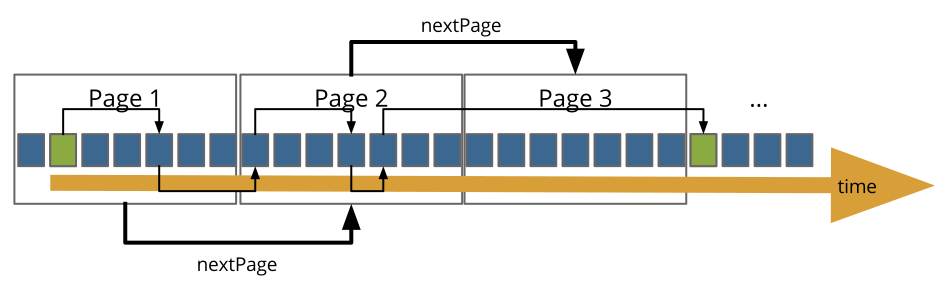
Linked Connections orders departure–arrival pairs by departure time and splits them into pages served over HTTP. Links let a client discover the next page and gather the connections it needs to plan a journey.
Select a departure pin on the map, then a destination. The iRail planner downloads LC 2.0-alpha Arrow data and calculates journeys in your browser. The original 1.0 demo is available in the second tab.
Profile connectionsSelected journey
The station map will load when you reach this demo.
Scheduled SNCB/NMBS services via iRail · Times in Europe/Brussels · Powered by @irail/planner.
The original LC 1.0 client follows RDF/JSON-LD connections. Select a departure pin on the map, then a destination.
The original demo will load when this tab is selected.
Implement a Linked Connections interface in your own software. Start with the RDF and JSON-LD specification, or explore the v2-alpha draft for Apache Arrow tables.
Read the specificationFind tools for publishing connections, converting GTFS, and planning routes in JavaScript. Contributions are welcome on GitHub.
Explore the toolsNeed support with Linked Connections? Contact Pieter Colpaert.